Access Calendar Seminar
Create Monthly Calendars in Microsoft Access
Welcome
If you've ever wanted to print monthly calendars from your Access databases, then this seminar is perfect for you.
This seminar covers creating an appointment database in Microsoft Access. You will create a form that looks like an actual monthly calendar, that you can review your appointments on. Then, when you're ready to print, just pick a month, and the report is generated. Click here for a video showing what's covered in this seminar:
 Resources Resources
Main Seminar Goals
- Build a calendar form to edit appointments
- Create a printable monthly calendar report
Topics Covered
You will begin by creating a basic table to store our appointment data. We'll also make a simple form to edit and add new records.
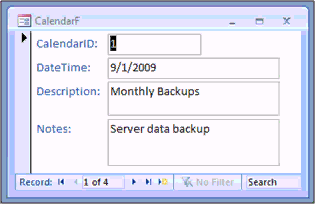
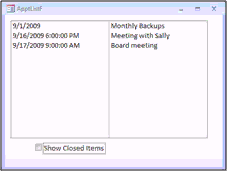
Next we'll build an appointment list form, where we can see all of our appointments. Double-click on an appointment to open and edit it. We'll also make a checkbox to allow us to see open vs. closed appointments (close it when you're done with it). You'll also learn about triple-state checkboxes where you can see open, closed, and ALL records.
In the next lessons we'll build a form to pick a date using a built-in Microsoft Access ActiveX Calendar control. Using this date, we'll generate our own form that looks like a full-sized monthly calendar, complete with all of our appointments on it.
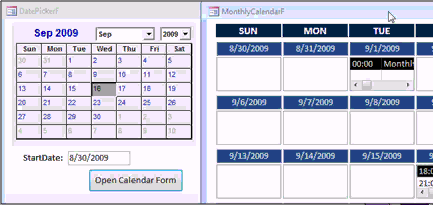
One of the things we're going to learn how to do is make the first day on our calendar form figure out what the first Sunday on or before the start of the month is, then build the rest of the calendar accordingly, greying out any days that are before or after the selected month. We'll tackle that with a little bit of VBA programming.
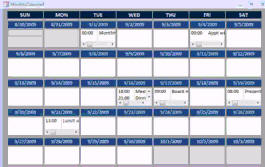
Of course, you'll be able to double-click on any appointment on the calendar to open up a popup form to edit that appointment.
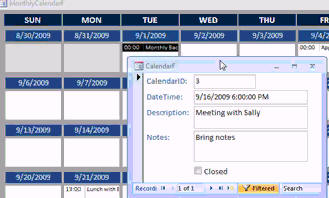
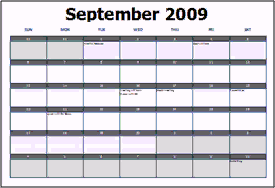
Then, once the form is completed, we'll create the printable monthly calendar report. We'll actually make two versions - I'll show you how to lay it out portrait and landscape.
Pre-Requisites
This is a Developer-Level Seminar. There will be a lot of VBA. It is strongly recommended that you have completed my entire Access Beginner and Expert series. My Developer 1 class is highly recommended so you understand the basics of programming in VBA. If not, at least watch my free Intro to VBA video.
Version
I am using Access 2007 in this seminar, however the lessons are perfectly valid for all versions of Access with a few minor addendums that I have noted on the Lessons Page. It's currently 2022 and I just made sure everything works fine with Access 2019 and Office 365.
Enroll Today
Enroll now so that you can watch these lessons, learn with us, post questions, and more.

Questions?
Please feel free to post your questions or comments below. If you are not sure as to whether or not this product will meet your needs, I'd rather help you before you buy it. Remember, all sales are final. Thank you.
Keywords
microsoft access calendar, appointments, monthly calendar view, monthly view, monthly calendar, calendar report
More InformationTranscript Introducing the Building a Calendar Seminar using Microsoft Access brought to you by AccessLearningZone.com. I am your instructor, Richard Rost. This video will give you a preview of what is covered in the seminar. The purpose of the seminar is to build a calendar using Microsoft Access.
This seminar has two goals. First, we want to build a calendar form, and second, build a printable calendar report. We will start with a simple table to store all of our appointments. Then we will build a form using Microsoft Access that will actually look like a calendar on the screen.
We will design the form so you can click on any of your appointments on the screen and open up a little appointment form to edit or add new ones. We will cover all the VBA code necessary to do things such as properly color the calendar form boxes and arrange them so that the proper dates show up on the calendar. The first Sunday, for example, on the calendar might not be the first of the month, so we will see how to deal with that problem.
Once we have the form completely built, we will build a printable monthly calendar report. I am going to show you all the techniques necessary to format this as a monthly calendar. However, you could print a weekly or biweekly calendar if you want to.
In lesson one, we are going to set up our database. We will create the database file, the table to store our calendar data, and a calendar form to view each item.
In lesson two, we are going to make an appointment list form where we can show a list of all of our appointment items on the calendar. Then we will make an option to show closed items or not. Old items can be closed, and then they do not show up on our calendar anymore.
In this lesson, I am going to show you how to use a triple-state checkbox to show the closed items, the open items, or all items in your appointment list.
In lesson four, we are going to start working on a monthly calendar form, a form that is going to look like an actual monthly calendar. We will start by making a query that has our dates with the timeline. We are going to isolate the time of the appointment. We will start making a date picker form so we can pick a date and then hit a button that opens the calendar. Then we will start making that monthly form to display our calendar.
In lesson five, we will take the calendar we have been building so far and expand on it so we can make list boxes for each of the days of the month.
In lesson six, we are going to use the calendar control, an ActiveX control that comes with Access, to make picking a start date easier. Then we are going to write some code to find the first Sunday on or before the first day of the month so we know where to start our calendar form.
In lesson seven, we are going to gray out the days from different months in our calendar form. For example, if the month starts on a Tuesday, the Sunday and Monday beforehand are from the previous month, so we will gray them out so they look different. We will do the same thing at the end of the month too. I am going to show you how to loop through the fields on the form with VBA code so we do not have to copy and paste the same lines of code for both times.
In lesson eight, we are going to clean up the format of our calendar form a little bit and we are going to make a double-click event for each of our boxes that will open up the specific appointment that we double-click on. More importantly, I am going to show you how to use Excel to automate that code a little bit.
In lesson nine, we are going to start working on the printable monthly calendar report.
In lesson ten, we are going to finish up our printed calendar report, our monthly calendar report. We are going to make some VBA code corrections that have to be done for reports. The code is going to work slightly differently for the report than it did for the form. We are going to see how detail build events work.
For more information on this seminar, just visit AccessLearningZone.com. Go to the seminars section and look for the Building a Calendar Seminar. Intro In this seminar, you'll learn how to build a complete calendar system in Microsoft Access, including both a visual calendar form and a printable monthly calendar report. We'll set up the database and tables to store appointments, create forms to view and edit events, use VBA code to handle calendar display and formatting, add features like triple-state checkboxes and date pickers, and utilize ActiveX controls for easier navigation. This seminar walks through building monthly forms, managing closed appointments, handling cross-month dates, and generating professional calendar reports you can print directly from Access. Quiz Q1. What are the two main goals of the Building a Calendar Seminar?
A. Build a calendar form and create a contacts database
B. Build a calendar form and a printable calendar report
C. Learn VBA basics and create a form
D. Import data from Excel and format reports
Q2. What is the first step in the seminar after the introduction?
A. Build a report template
B. Set up the database and create tables for calendar data
C. Import data from an external source
D. Download third-party calendar controls
Q3. What feature does the appointment form allow users to do?
A. Export appointments to Word
B. Edit or add new appointments by clicking on them
C. Send email reminders for appointments
D. Automatically sync with Outlook
Q4. What programming language is covered for customizing the calendar form?
A. JavaScript
B. Python
C. VBA (Visual Basic for Applications)
D. SQL only
Q5. How does the seminar suggest handling dates at the beginning and end of the month that are not in the current month on the calendar form?
A. Delete those dates from the calendar
B. Color them green
C. Gray them out to show they are from a different month
D. Hide them completely
Q6. What tool is introduced in lesson six to help users select dates more easily?
A. DateTime Picker in Word
B. Google Calendar integration
C. Calendar control (ActiveX control in Access)
D. Slide bar control from Excel
Q7. What does the triple-state checkbox in lesson three allow you to do?
A. Add, edit, and delete appointments
B. Show closed items, open items, or all items in the appointment list
C. Filter appointments by priority
D. Sync appointments with an external calendar
Q8. What does the seminar use VBA code to accomplish regarding the calendar form's appearance?
A. Print labels automatically
B. Properly color boxes and arrange dates to show correct calendar days
C. Animate the calendar transitions
D. Email appointment confirmations
Q9. In lesson eight, what automation feature is introduced to help with code management?
A. Using Word macros to generate appointment reminders
B. Using Excel to automate some of the code
C. Using PowerPoint for calendar design
D. Scripting with Python
Q10. What is a key difference discussed in lesson ten about handling reports versus forms?
A. Reports require more graphics
B. Reports use different VBA code behaviors, especially in detail build events
C. Forms cannot be printed
D. Forms do not allow VBA at all
Answers: 1-B; 2-B; 3-B; 4-C; 5-C; 6-C; 7-B; 8-B; 9-B; 10-B
DISCLAIMER: Quiz questions are AI generated. If you find any that are wrong, don't make sense, or aren't related to the video topic at hand, then please post a comment and let me know. Thanks. Summary Today's video from Access Learning Zone introduces the Building a Calendar Seminar, where I guide you step by step through the process of creating a functional calendar system in Microsoft Access. The main focus of this seminar is to teach you how to both construct a calendar form for managing appointments and generate a printable calendar report.
The seminar is structured around two primary objectives. The first is to develop an interactive form that lets you view and manage your calendar inside Access. The second involves creating a report that formats your appointments as a printed monthly calendar. To start, we set up a straightforward table for storing appointment data. From there, I walk you through designing a calendar-style form that visually resembles a traditional monthly calendar.
This form allows you to interact with your appointments by clicking on entries to open a separate appointment form, where you can add new items or edit existing ones. I will explain all the VBA code you need to ensure the calendar displays dates in the right positions and colors each cell appropriately. For instance, I cover how to handle months where the first day does not fall on a Sunday, which requires a bit of planning to display the calendar properly.
Once the interactive form is complete, we move on to building a printable monthly calendar. I explain all the formatting techniques needed to present your schedule as a professional-looking calendar page. While the seminar focuses on monthly calendars, you will also learn enough to adapt the system for weekly or biweekly formats if you prefer.
The seminar is organized into several focused lessons:
In the first lesson, we set up the fundamental elements. This includes making the database file, designing the table for the calendar data, and building an initial form to display appointments.
The second lesson develops an appointment list form. This form displays all your scheduled items and gives you the option to filter out closed or completed appointments, keeping your calendar current.
Lesson three introduces a triple-state checkbox, which gives you flexible control over which items appear: open, closed, or all appointments.
In the fourth lesson, we begin constructing a monthly calendar form that matches the look of a real calendar page. This involves developing a query to manage your appointment timelines, isolating appointment times, and building a date picker form so you can select a date and open the calendar for a specific month. We start assembling the monthly form at this stage.
Lesson five enhances the calendar design further by adding list boxes for each day so you can see daily appointments at a glance.
In lesson six, we integrate the calendar control, an ActiveX feature in Access, to simplify date selection. I show you how to write the VBA code needed to locate the first Sunday on or before any chosen month, ensuring the calendar grid displays the correct range of dates.
Lesson seven deals with differentiating days from previous or next months by shading them in your monthly calendar form. This visual distinction helps you quickly spot which days are not part of the current month. You will also learn to write efficient VBA code that loops through form controls, saving you time compared to copying code for each scenario.
The eighth lesson is all about streamlining the calendar's formatting and improving interactivity. I show you how to set up event handlers that let you double-click any calendar cell to open its related appointment directly. Additionally, I demonstrate how to use Excel to automate portions of your code, making development faster and easier.
In lesson nine, the focus shifts to creating a printable monthly report version of your calendar.
Lesson ten wraps up the report creation by making the necessary adjustments to your VBA code to accommodate the differences between forms and reports. I explain how the detail build events function so your report generates accurate calendar layouts.
For more details or to enroll in the Building a Calendar Seminar, visit my website at AccessLearningZone.com and look for the seminar under the seminars section. You can find a complete video tutorial with step-by-step instructions on everything discussed here on my website at the link below. Live long and prosper, my friends. Topic List Creating the calendar appointments table
Designing a calendar form to display appointments
Building an appointment entry and edit form
Writing VBA code to color calendar form boxes
Arranging proper date alignment in calendar forms
Handling calendar months that start midweek
Building a printable monthly calendar report
Formatting the report as a monthly calendar
Setting up the database file in Access
Creating an appointment list form
Adding filter options for closed and open appointments
Implementing a triple-state checkbox for filtering
Creating a date picker form
Building a monthly calendar form with date timeline
Adding list boxes for each day on the calendar form
Using the Access calendar ActiveX control for date selection
Finding the starting Sunday for the calendar display
Graying out days from other months in the calendar
Looping through form fields using VBA
Adding double-click events to calendar boxes
Automating code using Excel
Developing a printable calendar report
Applying VBA corrections for Access reports
Using detail build events for report display Primary Topics Microsoft Access, calendar database design, appointment table, Access forms, calendar report, VBA programming, UI interactivity, ActiveX controls, date handling
Secondary Topics data filtering, list forms, checkbox controls, report formatting, automation with Excel
|





